CLEAN UP AND SMOOTHING THE SKIN
Monday, 17 October 2011

Monday, 10 October 2011
Multimedia Development
Multimedia Development Process
Stage 1 : Motivation
This is the initial phase of multimedia production. Some basic agreements about the purpose and concept of the project are made among the production team in right form between the team and their clients.
Stage 2 : Analysis and Planning
This stage is where you have to decide the target or user of your project, planning the aims of your application and the way to distribute your final project. Projects often start with a meeting to discuss the project direction and plan. Defines and clarifies goals, roles, expectations, strategies, and manage financial sources when meeting with the users. Besides that , multimedia architect need solving rights problem to perform concept ional development . As a result, the requirements specification is produced and documented.
Stage 3 : Conception and Design
Discussions and meeting with the client and among the production team define what the product must deliver, in terms of information and function in order to meet the desired goals. It includes interviewing the client, developing a planning document, budgeting and controlling expenses, buying/renting equipment and tools, getting and installing software, and building specifications for production. In this stage the design of the application is decided, such as: how does each of the screen look like and which media elements will be included? Multimedia producers can design in storyboard. Storyboards describes the project in exact detail using words and sketches for each screen images, sound, and navigational choice. Storyboarding can be very detail. Multimedia producers can sketching out every screen, right down to specific colour and shade, text contents, attributes and others. Storyboard may be considered to be a specification of the prototype.
Stage 4 : Production
Production is the phase when your multimedia project is actually rendered and perform research for model and content . In this vital stage, multimedia producers create a rough layout and interface design, create suitable music, audio, photography, digital video, animation, 2D graphics,3D graphics and text. They need integrating all of the music, audio, photography, digital video, animation, motion graphics and text into a meaningful and coherent product. They assemble those elements into a proper prototype. They will have their own team review and critique in order to produce a better application or project.
Stage 5 : Product Testing
In this stage, software or application is tested. Client reviews the project for minor changes or correction, trials on other computers and with beta testers. Multimedia producers and users can use different types of testing such as functional, content testing, collateral materials testing and user testing. Besides that, multimedia producers will providing the product's documentation to the client. If the application does not work, it goes back to the design stage. Therefore, it is important to test the product in a wide range of configurations.
Stage 6 : Evaluation
During this stage, you decide and analysis whether the application meets the specifications which were made in the analysis stage.
Stage 7 : Final Revision
Final revisions include bug fixing, which include sound glitches, software glitches, typographical errors or a problem with functionality of a particular part of the interface.
Stage 8 : Distribution
Packaging the product in its final form for distribution (mastering , duplicating, packaging, shipping media, marketing and sales), installation on various mode : kiosk based, publishing on web sites, and/or public presentations.Besides that, set up delivery logistic and providing suitable infrastructure for mode chosen.
Stage 9 : Maintenance
This stage involves fixing any bugs that have been found after the application has been released. The application can be updated and adapted to suit the clients needs.
Reference :
Monday, 3 October 2011
Multimedia Information Retrieval / Content-based Information Retrieval
Multimedia Information Retrieval
Definition:
Multimedia information retrieval (Multimedia IR) is a multimedia information system that can retrieve and store attributes, text, 2D grey-scale and color images, digitized audio or music and also video. It can be defined as the activity and process of providing users the information they are looking for.۩Accuracy: Retrieve documents and information that the users expect to obtain
--> With few incorrect answers and information
۩Speed: Information retrievals has to be fast and can be obtained within seconds.
Published in all the multimedia information retrieval method is based on two principles :
1) Storage Oriented Retrieval Principle
The principle of the storage oriented principle is organization-oriented place where the documents are finally stored , or where reference to documents stored .
2) Probability Ranking Principle
If the reference retrieval system in response to the demands of each stage of documents in order to reduce the probability that the use of a collection of users who have
submitted a request , where the probability is estimated as accurately as possible on the basis of such data has been provided to the system for this purpose , the
overall effectiveness system to the consumer will be the best based on the data obtained.
Three Types of Multimedia Information Retrieval:
- Content-based Image Retrieval
- Content-based Video Retrieval
- Content-based Audio Retrieval
i) Content-based Image Retrieval
An application of searching for digital image in large databases.
ii) Content-based Video Retrieval
- Traditional video Retrieval such as Query-by-textual keyword.
- contain automatic visual concept detection. Example concepts are airplane, building , car, desert, explosion, outdoor, vehicle and violence.
iii) Content-based Audio Retrieval
An application to search sounds by features in the waveform, statistics, or transform domains.--> eg: speech, music, silence and environment audio.
Methods of accessing – Text
۩ Multimedia documents consist of text (Captions are available for images)
۩ Text retrieval has several applications (for example: library automation and web searching )۩ Text retrieval researches have led to useful functions like information filtering and relevant feedback.
Approximate Searching
Information retrieval is not an exact process:۩ Two documents are not identical۩ and yet , they can be “similar” to each other.۩ Searching must be “approximately”
Error Counting:
۩ Retrieve similar or relevant words or phrases
- retrieve phrases related to misspelled words
۩ Editing distance : numerical estimate of the similarity between 2 strings
۩ Phonetic coding : search words or phrases with similar pronunciation
۩ N-grams : count common N-length sub-strings
The effectiveness of Information Retrieval depends on:
۩Types and precision of descriptions۩Types of queries allowed۩Efficiency of search techniques
Problems of Information Retrieval:
۩Descriptions of text for images and video found are not available or provided in some documents. For example, the text of a web site is not always descriptive of every image and video.
۩Two different approaches:
1)Human Annotations:
Online users add on attributes, captions for particular images and videos
→ retrievals will unsuccessful if queries are formulated using different keywords or descriptions
→ inconsistent (different users will give different descriptions and captions)
2)Feature extraction
Features are extracted from audio, image and video
-consistent descriptions but inexact
-difficult to extract meaning

Content-based Information Retrieval
What is content-based information retrieval?
Text document retrieval
۩ Text -based documents are basically unstructured and complex . They can only consists of raw text , tagged structures ( such as html documents ) , includingembedded images , and may have some fixed attributes that contain metadata that describes the aspects of the document .
۩ Web document describes the element of the semi-structured document . The original Grieg site also contains a list of references / links that provide access to
multimedia documents of composers , including some music .
How to improve multimedia information retrieval by using content-based methods .
When the text comment is nonexistent or incomplete in , the content-based approach is necessary. In addition, content-based method can potentially improve the retrieval accuracy .Pratical application of CBIR
Crime preventation
- serious crime is commited,they can compare evidence from the scene crime for its similatary to records in their archivers.
- basic techniques for automatic fingerprint matching were worked out in the 1980s
- system based on this technology are how in routine use at the FBI in Washington
- Example – a numberof AFIS automatic fingerprint identification systems, AFIX,Tracker from Phoenix Comp-searching large database of fingerprint
- has been used for tall recognition also
Military
- Recognition of enemy aircraft from radan screw
- Identification of targets from satellite photograph
- Guidance system for cruise missiles
- Crime preventation
Intellectual property
- Copyright owners to seek and identity unauthorized copies of image
- Identification of illiat copies of image on the web
Architectural and Engineering Design
- Use of stylized 2D and 3D models
- Visualizing designs for the benefits of non-technical client
- Will meet specified suitability country
Fashion and Interior Designs
- Ability to search a collection of fabrics to find a particular combination of colour/texture is increasingly being recognize as a useful and to the design/process
- Colour matching of items
- Identify textile samples bearing a desired pattern
- provide efficient d effective retrieval of still imagesfrom photo liratries
- For area of video asset management :
CBIR needed to break up a video sequence into indiviual shots
generate representative keyframes for each shot - A degree of automatic video indexing and retrieval
Mediakey Digital Video Library System from Islip Media
Inc (based on Carnegie-Mellon University's highly-suceessful Information technology[Wactlar,1996]
visionary from the Israel-based Media Acess Technologies Ltd(Wilf,1998)
- Identify medical images relating to a named patient
- CBIR works in PACS for a better quality of medical imaging

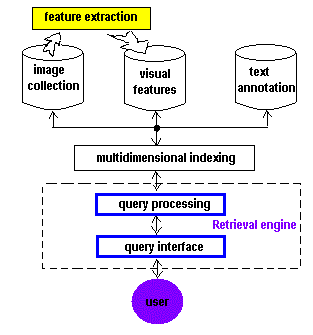
Content Based Video Information Retrieval
Reference:
http://www.intelligence.tuc.gr/~petrakis/courses/multimedia/retrieval.pdf
http://www.liacs.nl/~mlew/mir.survey16b.pdf
http://lyle.smu.edu/~mhd/8337sp09/mir.pdf
http://books.google.com.my/books?hl=en&lr&id=7ZhpFwcFxfwC&oi=fnd&pg=PA1&dq=multimedia+information+retrieval&ots=jSjJuwVFc9&sig=Vh8rTx_K807k1Dg5VTPfOkgxs_U#v=onepage&q&f=false
http://nordbotten.com/ADM/ADM_book/MIRS-frame.htm
http://www.eps.uam.es/esp/alumnos/trabajos_fin_master/Martinez_Martinez_Rafael.pdf
http://www.google.com.my/imgres?q=multimedia+information+retrieval&hl=en&sa=G&gbv=2&biw=1280&bih=699&tbm=isch&tbnid=6KtkqY7FtBe30M:&imgrefurl=http://www.science.uva.nl/research/publications/2008/LiICMIR2008/&docid=zNWq25Fc0kwkHM&w=6331&h=4363&ei=4OaJTsmAL8HOrQfBmtTvDA&zoom=1&iact=hc&vpx=380&vpy=145&dur=9212&hovh=186&hovw=271&tx=120&ty=82&page=1&tbnh=130&tbnw=189&start=0&ndsp=20&ved=1t:429,r:1,s:0
http://youtu.be/jy7B0knFfXA
http://www.google.com.my/imgres?q=content+based+information+retrieval&hl=en&gbv=2&biw=1280&bih=699&tbm=isch&tbnid=IkL_deNEB804vM:&imgrefurl=http://www.cs.auckland.ac.nz/compsci708s1c/lectures/Glect-html/topic1c708FSC.htm&do
http://www.google.com.my/imgres?q=content+based+information+retrieval&hl=en&gbv=2&biw=1280&bih=699&tbm=isch&tbnid=MF7gf-K90sPhXM:&imgrefurl=http://getglue.com/topics/p/co
Sunday, 25 September 2011
What is Augmented Reality?
Definition:
Augmented Reality(AR) is a technology where researchers pull graphics out of television and computer and integrating them into real-world environments. An augmented reality system generates a composite view, which is the combination of the real scene and a virtual scene(generated by computer) that enhances the scene with additional information.
History:
From Year 1957 - Morton Helig began building a machine, Sensorama.
Year 1962 - First Simulator
→ It was successfully created (with sound, visuals, vibration and smell)
Year 1966 - Head-mounted Display
→Ivan Sutherland invented the head-mounted display suggesting it was a window into a virtual world. It consists of a head-mounted display, an ultrasonic tracker and a mechanical tracker.
Year 1975 - Artificial Reality Lab was set up
→ Myron Krueger created Videoplace, an artificial reality laboratory. It allows users to interact with virtual objects for the first time.
Year 1989 - Virtual Reality invented
→ Jaron Lanier introduced the phrase Virtual Reality.
Year 1990 - Augmented Reality Coined
→Tom Caudell coined the phrase Augmented Reality while at Boeing helping workers assemble cables into aircraft.
Year 1992 - Augmented Reality Named
→ David Mizell coined the term augmented reality.
Year 1993 - First Outdoor Navigation System
→ Loomis et al. developed a prototype of an outdoor navigation system for visually impaired. This consists of a differential GPS receiver and a head worn electronic compass to provide “acoustic virtual display”.
Year 1994 - Augmented Reality Defined
→ Paul Milgram and Fumio Kishino wrote their seminal paper, "Taxonomy of Mixed Reality Visual Displays".
Year 1997 - Augmented Reality Refined
→ Ronald Azuma did a survey which defined the field of AR.
Year 1999 - Augmented Reality Toolkit invented
→ Mark Billinghurst and Hirokazu Kato invented this toolkit that uses fiducial markers.
Year 2000 - First Augmented Game was invented
→Bruce Thomas presents augmented reality Quake , an AR first person shooter .
Year 2002 - Leading Pioneer of AR
→Steven Feiner is the leading pioneer of augmented reality. He is the author of the first paper on AR. Feiner, S. K."Augmented Reality: A New Way of Seeing: Computer scientists are developing systems that can enhance and enrich a user's view of the world". Scientific American, April 2002.
Year 2003 - Indoor Augmented Reality
→An indoor AR guidance system was demostrated on the PDA.
Year 2004 - First Mobile Augmented Reality system for phones
→Mathias Mohring proposed 3D tracking Augmented Reality system for mobile phone.
Year 2005 -
i) Development of Camera System
→Camera system developed that can analyze physical environments in real time and relate positions between objects and environments.
ii) Bionic Eyes
→Daniel Palanker, Phil Huie and Alexander Vankov developed "bionic eye".
Year 2007 -
i) Commanding of Virtual Instruments
→Facial feature tracking to allow for greater control of perspective. For example, a conductor could command a certain set of virtual instruments with the movement of his eyes.
ii) Medical applications
→Medical applications for users. Sending visual cues to help MS patients better keep their balance.
Year 2008 - Launching of Wikitude AR Travel Guide
→It pulls data from wikipedia entries based on a user's GPS location. It overlays it onto the real time camera view of the android phone.
Year 2009
i) Augmented Reality Toolkit ported to Flash
→By Saqoosha, allows augmented reality applications to be built for the web.
browser.
ii)Launching of Layar
→ Layar is the first truly mainstream Augmented Reality App for the Apple i-phone.
Application of Augmented Reality
1. Wikitude World Browser
World Browser is a browser-based augmented reality, and location-based Wikipedia content Qype. From 350,000 points of interest around the world, through GPS or address, you can search and display in a list view, map view and the "augmented reality” view cam.

2. Satellite Augmented Reality
Point to the sky on your phone, look at the actual cost off lying in the augmented reality view of the satellite. Various satellite icons will appear. In the sun's color is yellow to help you see them in a clear night.

3. Google Sky Map
Google Sky Map Android platform phone into a window on the night sky. Pointing to the sky on your phone, and Google Sky maps show the stars, planets, constellations, and more to help you determine the view objects.


6. 3D AR Compass
This program is an enhanced three-dimensional compass, compass and more realistic type of facility automatically rotate the map, title and degree, current address, bright and more rapid.

7. AR Shooting


9. AR Basketball
Into a small basketball court becomes your reality. All you need is a piece of paper to play basketball and your phone. Function of augmented reality game needs to take care of the rest.

10. Danger Copter
Helicopter is a dangerous adventure game player to become a rescue helicopter and the pilot exercise of the water spray between the skyscrapers of knives, fire and rescue people from danger.

11. TAT Augmented ID
This program uses the Flickr Polar Rose facial recognition technology to determine a person's face, as they pull up personal information on line and contact details. Creepy and amazing at the same time.

12 . Sixth Sense
Sixth Sense found in many system such as : camera , small projector , smart phone and mirror . Sixth Sense is significant because it uses simple ready-made components . It is also noteworthy because the projector surface can change into an interactive screen . In essence , the device uses cameras and mirrors to look around the world then transfer into cell phone image (image processing , GPS coordinates , and extract data from internet) . Projected from the projector can send information to the in front of the user . As the user wearing the camera on his chest , he will focus on increasing Sixth sense .

13 . Cell Phone
Augmented reality already have been for some phones , especially for the iPhone and Android mobile phone of operating system applications . In the Netherlands , mobile phones users can using the phone’s camera and GPS to collect information about the surrounding area. Hidden part of augmented reality known as the single , it need something a step . Yelp will begin application and shake three single to activation iPhone 3GS . Therefore , the phone screen will displayed information through the phone’s GPS and compass . Application of basic mobile phone is GPS and compass which can give people know where they are . Layar is a free Android software which shows you through the phone’s camera in the real world on real-time digital information display what is on your side . Layer is made of SPRX mobile development and support of T-Mobile G1 , HTC Magic and other Android phones .

14 . Video Games And The Military
Video game companies are quickly jumping on board the locomotive of augmented reality . A software company called Total Immersion make augmented reality inside the baseball cards . When you online , download the Total Immersion software and then hold up your baseball card to a webcam . Therefore , the software can identify the card and the computer screen will display associated video . Indirectly , the screen of 3-D figure will perform actions , such as throwing a ball in the target implementation actions. Head-mounted display is a augmented reality devices which give us a sort of virtual reality equipment and overlay information in our world . An augmented reality enable head-mounted display cover a blueprint or directly from a satellite or unmanned aircraft overhead the soldiers perspective .

LIMITATIONS AND THE FUTURE OF AUGMENTED REALITY
Augmented reality has some challenges to overcome . GPS is only accurate within 30 feet (9 meters) and although improved image-recognition technology also does not work aswell indoors . People may not want to rely on their mobile phones including the information superimposed on the small screen . For this reason , Sixth sense or augmented reality glasses , contact lenses and wearable devices provide users with more convenient , the expansion of the world around them advice . In the near future , you may be able to play on the computer’s real-time strategy . There are also have privacy concerns . Image recognition software combined with the augmented reality will let people , even stranger can immediately see that they are on Facebook , Twitter , Amazon , Linkedln or other online personal information .
CONCLUSION
Augmented reality of the future is clearly bright , even as it has entered our cell phones and video game systems approach .
Reference
http://mashable.com/2009/08/19/augmented-reality-apps/
http://www.iphoneness.com/iphone-apps/best-augmented-reality-iphone-applications/
http://techsplurge.com/3214/mega-list-33-awesome-augmented-reality-apps-games-android/
www.se.rit.edu/~jrv/research/ar/
http://en.wikipedia.org/wiki/Augmented_realityhttp://computer.howstuffworks.com/augmented-reality4.htm
http://htc-phones.net/android-software-layer-mobile-augmented-reality-browser.html
http://threeminds.organic.com/2009/03/projected_gesture-driven_inter.html
citeseerx.ist.psu.edu/viewdoc/download?doi=10.1.1.8.6513&rep...
http://augreality.pbworks.com/w/page/9469037/History%20of%20AR%20and%20Key%20Researchers%20
http://net.educause.edu/ir/library/pdf/ELI7007.pdf
http://www.webopedia.com/TERM/A/Augmented_Reality.html
http://www.xtimeline.com/timeline/Augmented-Reality-History
Augmented Reality(AR) is a technology where researchers pull graphics out of television and computer and integrating them into real-world environments. An augmented reality system generates a composite view, which is the combination of the real scene and a virtual scene(generated by computer) that enhances the scene with additional information.
History:
From Year 1957 - Morton Helig began building a machine, Sensorama.
Year 1962 - First Simulator
→ It was successfully created (with sound, visuals, vibration and smell)
Year 1966 - Head-mounted Display
→Ivan Sutherland invented the head-mounted display suggesting it was a window into a virtual world. It consists of a head-mounted display, an ultrasonic tracker and a mechanical tracker.
Year 1975 - Artificial Reality Lab was set up
→ Myron Krueger created Videoplace, an artificial reality laboratory. It allows users to interact with virtual objects for the first time.
Year 1989 - Virtual Reality invented
→ Jaron Lanier introduced the phrase Virtual Reality.
Year 1990 - Augmented Reality Coined
→Tom Caudell coined the phrase Augmented Reality while at Boeing helping workers assemble cables into aircraft.
Year 1992 - Augmented Reality Named
→ David Mizell coined the term augmented reality.
Year 1993 - First Outdoor Navigation System
→ Loomis et al. developed a prototype of an outdoor navigation system for visually impaired. This consists of a differential GPS receiver and a head worn electronic compass to provide “acoustic virtual display”.
Year 1994 - Augmented Reality Defined
→ Paul Milgram and Fumio Kishino wrote their seminal paper, "Taxonomy of Mixed Reality Visual Displays".
Year 1997 - Augmented Reality Refined
→ Ronald Azuma did a survey which defined the field of AR.
Year 1999 - Augmented Reality Toolkit invented
→ Mark Billinghurst and Hirokazu Kato invented this toolkit that uses fiducial markers.
Year 2000 - First Augmented Game was invented
→Bruce Thomas presents augmented reality Quake , an AR first person shooter .
Year 2002 - Leading Pioneer of AR
→Steven Feiner is the leading pioneer of augmented reality. He is the author of the first paper on AR. Feiner, S. K."Augmented Reality: A New Way of Seeing: Computer scientists are developing systems that can enhance and enrich a user's view of the world". Scientific American, April 2002.
Year 2003 - Indoor Augmented Reality
→An indoor AR guidance system was demostrated on the PDA.
Year 2004 - First Mobile Augmented Reality system for phones
→Mathias Mohring proposed 3D tracking Augmented Reality system for mobile phone.
Year 2005 -
i) Development of Camera System
→Camera system developed that can analyze physical environments in real time and relate positions between objects and environments.
ii) Bionic Eyes
→Daniel Palanker, Phil Huie and Alexander Vankov developed "bionic eye".
Year 2007 -
i) Commanding of Virtual Instruments
→Facial feature tracking to allow for greater control of perspective. For example, a conductor could command a certain set of virtual instruments with the movement of his eyes.
ii) Medical applications
→Medical applications for users. Sending visual cues to help MS patients better keep their balance.
Year 2008 - Launching of Wikitude AR Travel Guide
→It pulls data from wikipedia entries based on a user's GPS location. It overlays it onto the real time camera view of the android phone.
Year 2009
i) Augmented Reality Toolkit ported to Flash
→By Saqoosha, allows augmented reality applications to be built for the web.
browser.
ii)Launching of Layar
→ Layar is the first truly mainstream Augmented Reality App for the Apple i-phone.
Application of Augmented Reality
1. Wikitude World Browser
World Browser is a browser-based augmented reality, and location-based Wikipedia content Qype. From 350,000 points of interest around the world, through GPS or address, you can search and display in a list view, map view and the "augmented reality” view cam.

2. Satellite Augmented Reality
Point to the sky on your phone, look at the actual cost off lying in the augmented reality view of the satellite. Various satellite icons will appear. In the sun's color is yellow to help you see them in a clear night.

3. Google Sky Map
Google Sky Map Android platform phone into a window on the night sky. Pointing to the sky on your phone, and Google Sky maps show the stars, planets, constellations, and more to help you determine the view objects.

4. Sekai Camera
Sekai Camera is a community in the world of AR applications for users in the social interaction, by connecting to there world of digital content.
Sekai Camera is a community in the world of AR applications for users in the social interaction, by connecting to there world of digital content.

5. Photos Around
Panoramio pictures displayed on your current location from an AR view in the vicinity of popular photos. Location of the point of your camera, you see floating around in other people take a different photo.
Panoramio pictures displayed on your current location from an AR view in the vicinity of popular photos. Location of the point of your camera, you see floating around in other people take a different photo.

6. 3D AR Compass
This program is an enhanced three-dimensional compass, compass and more realistic type of facility automatically rotate the map, title and degree, current address, bright and more rapid.

7. AR Shooting
This is an application environment in an AR shooting. Use your camera and start shooting. You can use seven guns, including pistols, shotguns, etc.; can be semi-automatic or fully automatic.

8. Travel Guide
Travel guide on steroids. Not only can help you more easily in foreign cities, its AR technology,to help you quickly get your POI.
Travel guide on steroids. Not only can help you more easily in foreign cities, its AR technology,to help you quickly get your POI.

9. AR Basketball
Into a small basketball court becomes your reality. All you need is a piece of paper to play basketball and your phone. Function of augmented reality game needs to take care of the rest.

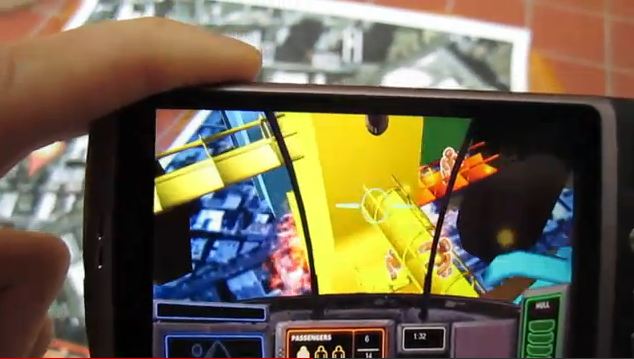
10. Danger Copter
Helicopter is a dangerous adventure game player to become a rescue helicopter and the pilot exercise of the water spray between the skyscrapers of knives, fire and rescue people from danger.
11. TAT Augmented ID
This program uses the Flickr Polar Rose facial recognition technology to determine a person's face, as they pull up personal information on line and contact details. Creepy and amazing at the same time.

12 . Sixth Sense
Sixth Sense found in many system such as : camera , small projector , smart phone and mirror . Sixth Sense is significant because it uses simple ready-made components . It is also noteworthy because the projector surface can change into an interactive screen . In essence , the device uses cameras and mirrors to look around the world then transfer into cell phone image (image processing , GPS coordinates , and extract data from internet) . Projected from the projector can send information to the in front of the user . As the user wearing the camera on his chest , he will focus on increasing Sixth sense .

13 . Cell Phone
Augmented reality already have been for some phones , especially for the iPhone and Android mobile phone of operating system applications . In the Netherlands , mobile phones users can using the phone’s camera and GPS to collect information about the surrounding area. Hidden part of augmented reality known as the single , it need something a step . Yelp will begin application and shake three single to activation iPhone 3GS . Therefore , the phone screen will displayed information through the phone’s GPS and compass . Application of basic mobile phone is GPS and compass which can give people know where they are . Layar is a free Android software which shows you through the phone’s camera in the real world on real-time digital information display what is on your side . Layer is made of SPRX mobile development and support of T-Mobile G1 , HTC Magic and other Android phones .

14 . Video Games And The Military
Video game companies are quickly jumping on board the locomotive of augmented reality . A software company called Total Immersion make augmented reality inside the baseball cards . When you online , download the Total Immersion software and then hold up your baseball card to a webcam . Therefore , the software can identify the card and the computer screen will display associated video . Indirectly , the screen of 3-D figure will perform actions , such as throwing a ball in the target implementation actions. Head-mounted display is a augmented reality devices which give us a sort of virtual reality equipment and overlay information in our world . An augmented reality enable head-mounted display cover a blueprint or directly from a satellite or unmanned aircraft overhead the soldiers perspective .

LIMITATIONS AND THE FUTURE OF AUGMENTED REALITY
Augmented reality has some challenges to overcome . GPS is only accurate within 30 feet (9 meters) and although improved image-recognition technology also does not work aswell indoors . People may not want to rely on their mobile phones including the information superimposed on the small screen . For this reason , Sixth sense or augmented reality glasses , contact lenses and wearable devices provide users with more convenient , the expansion of the world around them advice . In the near future , you may be able to play on the computer’s real-time strategy . There are also have privacy concerns . Image recognition software combined with the augmented reality will let people , even stranger can immediately see that they are on Facebook , Twitter , Amazon , Linkedln or other online personal information .
CONCLUSION
Augmented reality of the future is clearly bright , even as it has entered our cell phones and video game systems approach .
Reference
http://mashable.com/2009/08/19/augmented-reality-apps/
http://www.iphoneness.com/iphone-apps/best-augmented-reality-iphone-applications/
http://techsplurge.com/3214/mega-list-33-awesome-augmented-reality-apps-games-android/
www.se.rit.edu/~jrv/research/ar/
http://en.wikipedia.org/wiki/Augmented_realityhttp://computer.howstuffworks.com/augmented-reality4.htm
http://htc-phones.net/android-software-layer-mobile-augmented-reality-browser.html
http://threeminds.organic.com/2009/03/projected_gesture-driven_inter.html
citeseerx.ist.psu.edu/viewdoc/download?doi=10.1.1.8.6513&rep...
http://augreality.pbworks.com/w/page/9469037/History%20of%20AR%20and%20Key%20Researchers%20
http://net.educause.edu/ir/library/pdf/ELI7007.pdf
http://www.webopedia.com/TERM/A/Augmented_Reality.html
http://www.xtimeline.com/timeline/Augmented-Reality-History
Subscribe to:
Comments (Atom)